About WiFi Monitor: network analyzer
WiFi Monitor is a powerful Wi-Fi analyzer and network monitor that helps you check the state of wireless networks and track every important parameter: signal strength, frequency, channel, connection speed and more. It is...
WiFi Monitor is a powerful Wi-Fi analyzer and network monitor that helps you check the state of wireless networks and track every important parameter: signal strength, frequency, channel, connection speed and more. It is the essential tool for setting up a router, improving Wi-Fi coverage and monitoring the devices connected to your WLAN.
Whether you want to find the best Wi-Fi channel, measure signal strength (RSSI) in dBm, track Wi-Fi receive and transmit speed over time or scan for unknown devices on your network, WiFi Monitor gives you clear graphs and detailed information in a single app.
Key features:
• Detailed info about your current WiFi connection
• Wi-Fi analyzer with real-time signal strength graphs
• Channel spectrum graphs for the 2.4 GHz, 5 GHz and 6 GHz bands
• Network scanner to discover connected devices
• Router and vendor detection by MAC address (OUI)
• Ping and latency test to the gateway and internet hosts
"Connection" tab shows information about the connected WiFi hotspot:
• name (SSID) and identifier (BSSID)
• router manufacturer (vendor)
• connection speed
• signal strength (RSSI)
• frequency, channel number, channel width and Wi-Fi standard
• security options (WPA, WPA2, WPA3)
• ping and latency to the gateway and the internet
• internet provider info: network name, description, ASN, country, region and city when available
• IP address of your device
• subnet mask, default gateway and DNS address
"Networks" tab lets you analyze all available Wi-Fi networks by type, equipment manufacturer, signal level and security protocol. Access points with the same name (SSID) are grouped together, and the list can be filtered by name, band or security and sorted by strength, name or channel.
"Channels" tab displays how available access points are spread across channels in the 2.4 GHz, 5 GHz and 6 GHz bands. Routers using the same or overlapping frequencies reduce Wi-Fi quality, so choosing a free channel is the key to a fast and stable wireless connection.
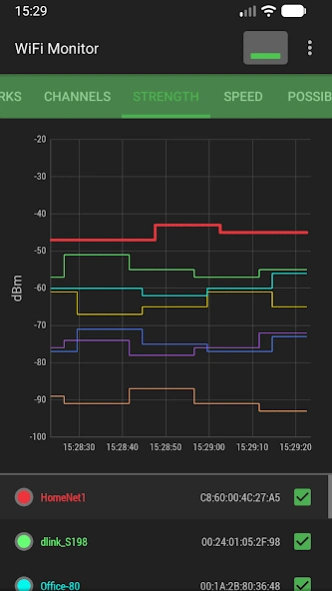
"Strength" chart compares the received power levels (RSSI) of nearby Wi-Fi hotspots and tracks their dynamics over time. The higher the router signal strength, the better the quality of your wireless connection.
"Speed" chart displays the real amount of transmitted and received data in the connected network, including average and maximum upload and download speed, so you can analyze your traffic and hotspot performance.
"Capabilities" tab shows the WiFi standards (802.11n/ac/ax and more), frequency bands and technologies (P2P, TDLS, RTT) supported by your device.
"Scanning" section searches for devices connected to your current WiFi network and shows their IP address, MAC address and manufacturer (vendor by OUI). If the scanner reports unknown or foreign devices in your WLAN, you can block them in your router settings.
Collected data can be saved to a log file and exported to other applications.
WiFi Monitor is useful for everyone who wants to:
• test and improve Wi-Fi signal strength and coverage
• find the least busy WiFi channel
• measure connection speed and network latency
• scan the LAN and see all connected devices
• check network security (WPA / WPA2 / WPA3)
In settings you can choose a light, dark or system theme.
Previous Versions
Here you can find the changelog of WiFi Monitor: network analyzer since it was posted on our website on 2019-09-06 18:13:15.
The latest version is 3.0.0 and it was updated on 2026-10-12 23:27:25. See below the changes in each version.
WiFi Monitor: network analyzer version 3.0.0
Updated At: 2026-09-22
Changes: - Choice of a light, dark, or system theme.
- More informative notification.
- New data on the "Connection" tab (channel width, security protocols, network interface name).
WiFi Monitor: network analyzer version 2.16.3
Updated At: 2026-08-04
Changes: Bug fixes
WiFi Monitor: network analyzer version 2.12.5
Updated At: 2025-05-11
Changes: Manufacturers database updated
WiFi Monitor: network analyzer version 2.10.6
Updated At: 2024-01-04
Changes: New tab: "Possibilities"
WiFi Monitor: network analyzer version 2.9.1
Updated At: 2023-11-16
Changes: - security technology filter
WiFi Monitor: network analyzer version 2.6.18
Updated At: 2023-05-31
Changes: - network map added
- ISP information added
- current security type
WiFi Monitor: network analyzer version 2.5.9
Updated At: 2022-01-08
Changes: - bugs fixed
WiFi Monitor: network analyzer version 2.5.8
Updated At: 2021-10-26
Changes: - manufacturerы database update
- WPA3 detection fixed
WiFi Monitor: network analyzer version 2.5.6
Updated At: 2021-08-12
Changes: - filtering networks by name (SSID)
WiFi Monitor: network analyzer version 2.5.4
Updated At: 2021-06-08
Changes: - the ability to track a specific network after clicking on it in the Networks tab
- bugs fixed
Disclaimer
Official Google Play Link
We do not host WiFi Monitor: network analyzer on our servers. We did not scan it for viruses, adware, spyware or other type of malware. This app is hosted by Google and passed their terms and conditions to be listed there. We recommend caution when installing it.
The Google Play link for WiFi Monitor: network analyzer is provided to you by apps112.com without any warranties, representations or guarantees of any kind, so access it at your own risk.
If you have questions regarding this particular app contact the publisher directly. For questions about the functionalities of apps112.com contact us.